Showing posts with label usb. Show all posts
Showing posts with label usb. Show all posts
Thursday, December 29, 2016
Download HP USB Disk Storage Format Tool 2 2 3 Full Version Offline Setup Free
Download HP USB Disk Storage Format Tool 2 2 3 Full Version Offline Setup Free

 This is a Hard Disk Utility Software which will format your USB Disk with your choice , e.g FAT, FAT32, or NTFS Partition Type. This is a Very Safe way to Format any USB Disk ( Pendrive or Memory Card). Moreover, unlike this tiny utility, the Windows tool does not offer a NTFS volume label for format; the freeware in discussion also allows users to create a FAT32 volume which is larger than 32GB. In addition, HP USB Disk Storage Format Tool enables users to rename all their USB flash drives in any way they want.
How to use it- You have to just specify the connected USB disk to you Computer and Choose your Choice FORMAT type and you are done.
Features:
- Format FAT32 files larger then 32 GB.
- The Interface is very Easy.
- Quick and Easy
- Safe to use.
Download HP USB Disk storage
Go to link Download

Sunday, December 18, 2016
Disable USB ports on Windows PC Registry Method
Disable USB ports on Windows PC Registry Method
This trick allows you to disable access to your USB(Universal Serial Bus) ports on your Windows based PC to prevent people from taking out data without permission or spreading viruses through the use of USB (pen and flash) drives.
To use this trick to disable USB ports, follow the steps given below:-
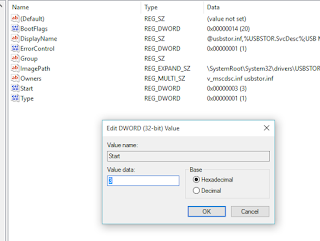
Try it yourself to make your PC invulnerable from data theft and malware which spread through USB ports. This works on Windows XP, Windows Vista, Windows 7 and Windows 8/8.1, Windows 10.
Note: This trick also disables access to your USB connected peripheral devices. So, do not use it if you have USB connected keyboard and mouse.
Values of [Start] key: Value 3 is for Enabling Ports & Value 4 is for disabling Ports.
To use this trick to disable USB ports, follow the steps given below:-
- Click on Start.
- Click on Run. If you cannot find RUN, type it in the search box.
- Type "regedit" without quotes. This will launch the Registry Editor.
- Navigate to HKEY_LOCAL_MACHINESYSTEMCurrentControlSetServicesusbstor.
- In the work area, double click on Start.
- In the Value Data box, enter 4.
- Click on OK.
- Close Registry Editor and refresh your desktop.
- To re-enable access to your USB ports, enter 3 in the Value Data box in Step 6.
Try it yourself to make your PC invulnerable from data theft and malware which spread through USB ports. This works on Windows XP, Windows Vista, Windows 7 and Windows 8/8.1, Windows 10.
Note: This trick also disables access to your USB connected peripheral devices. So, do not use it if you have USB connected keyboard and mouse.
Values of [Start] key: Value 3 is for Enabling Ports & Value 4 is for disabling Ports.
Go to link Download
Subscribe to:
Posts (Atom)