Tuesday, December 20, 2016
Display the file size information in Folder Tips using Folder Options the Registry and Regdevelop
Display the file size information in Folder Tips using Folder Options the Registry and Regdevelop
When you move the mouse cursor to a certain folder, by default, windows displays the file size information as shown below:

Let’s study how its made using the folder option and Windows registry.

We’ll unchecked the option at Folder Options window and you’ll see the results that the folders file size information was remove at the Info Tip.

Windows Registry Location
HKEY_CURRENT_USERSoftwareMicrosoftWindowsCurrentVersionExplorerAdvanced
Registry Value Name: FolderContentsInfoTip
The default value is 1 and when the option was unchecked, it gives a value of 0 and 1 for the option is enabled.
Next, Let’s recreate the said tweak using Regdevelop for our own application using the values above:

Drag and drop the checkbox control into the form and change the configuration details and pattern them to the registry information above.
Caption
Display the File Size Information for Folders
RegKeyPath1
HKEY_CURRENT_USERSoftwareMicrosoftWindowsCurrentVersionExplorerAdvanced
Value_Name1
FolderContentsInfoTip
ValueData1
1
ValueType1
DWORD
DeleteWhenUnchecked
False
RegKeyPath2
HKEY_CURRENT_USERSoftwareMicrosoftWindowsCurrentVersionExplorerAdvanced
Value_Name2
FolderContentsInfoTip
ValueData2
0
ValueType2
DWORD
Click the Start Button to test the program and afterwards, the Build Now Button to finish creating the application using RegDevelop.
From the tip above, Regdevelop lets you create program in minutes using Windows Registry information. Create your own TweakUI program – Using the development tool Regdevelop Tweakui functions can be duplicated and enhance.
Thanks for reading the tip!
Go to link Download

Sunday, December 18, 2016
Disable USB ports on Windows PC Registry Method
Disable USB ports on Windows PC Registry Method
To use this trick to disable USB ports, follow the steps given below:-
- Click on Start.
- Click on Run. If you cannot find RUN, type it in the search box.
- Type "regedit" without quotes. This will launch the Registry Editor.
- Navigate to HKEY_LOCAL_MACHINESYSTEMCurrentControlSetServicesusbstor.
- In the work area, double click on Start.
- In the Value Data box, enter 4.
- Click on OK.
- Close Registry Editor and refresh your desktop.
- To re-enable access to your USB ports, enter 3 in the Value Data box in Step 6.
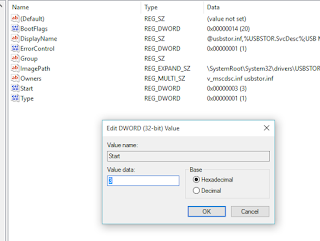
Try it yourself to make your PC invulnerable from data theft and malware which spread through USB ports. This works on Windows XP, Windows Vista, Windows 7 and Windows 8/8.1, Windows 10.
Note: This trick also disables access to your USB connected peripheral devices. So, do not use it if you have USB connected keyboard and mouse.
Values of [Start] key: Value 3 is for Enabling Ports & Value 4 is for disabling Ports.
Go to link Download
Saturday, October 29, 2016
Download AVS Registry Cleaner 2 3 5 Full Version
Download AVS Registry Cleaner 2 3 5 Full Version

Download AVS Registry Cleaner 2.3.5 Full Version - Good night kloningsoft buddy, how are you all? What are you doing now? admin just from futsal sport with friends Babarsari offices in the area. Activities exhausting, but exciting and sweat rain actually is to process the fat into a substance that is capable to be used as health. This time the admin wanted to share all the software that you should have, ie AVS Registry Cleaner 2.3.5. With this software of our expectations to remain environmentally friendly and results-oriented with emphasis on computer performance excellence.

This is one of the main software programs you can rely on to repair a damaged registry, and the registry errors and delete various registry is unnecessary and potentially burdensome system.
Restore the Windows registry to its original state before clearing
Reverse the changes made by the registry cleaning program, if necessary.
Improve the performance and stability of your Windows PC
Able to make a copy of the corrected file
Backing up takes only a few seconds
Remove information that is no longer used
Go to link Download