Showing posts with label cc. Show all posts
Showing posts with label cc. Show all posts
Tuesday, January 24, 2017
Download Add on IDM CC lastest version 7 3 51 for Firefox
Download Add on IDM CC lastest version 7 3 51 for Firefox
Q. Ive just updated Firefox to its newest version and IDM integration into Firefox stopped working. IDM does not take over downloads from Firefox anymore. What can I do to fix it?
Q. Firefox said it had disabled the IDM extension because it wasnt compatible. How do I resolve the problem?
Q. I cannot integrate IDM into FireFox 23, FireFox 22, FireFox 21, FireFox 20, FireFox 19, FireFox 18, FireFox 17, FireFox 16, FireFox 15, FireFox 14, FireFox 13, FireFox 12, FireFox 11, FireFox 10, FireFox 9, FireFox 8, FireFox 7, FireFox 6, FireFox 5, FireFox 4, FireFox 3). What should I do?
1. Please make sure that you have installed the latest version of IDM by using Help->Quick Update menu item. Please use "Help->Quick Update" IDM main menu item to get the latest version of IDM.
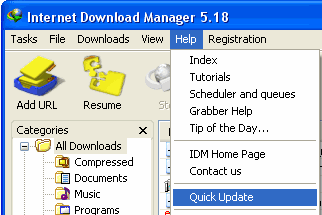
2. Dont forget to turn on the corresponding checkbox for browsers that you use in IDM Options -> General tab.
3. Its possible that you need to update IDM extension for Firefox. Pick "Tools->Add-ons" menu item in Firefox
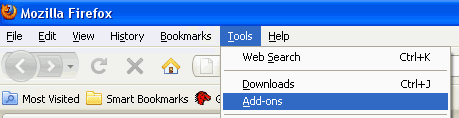
Add-ons dialog should open. Click on "Extensions" tab and find IDM CC (Internet Download Manager integration module for Mozilla):
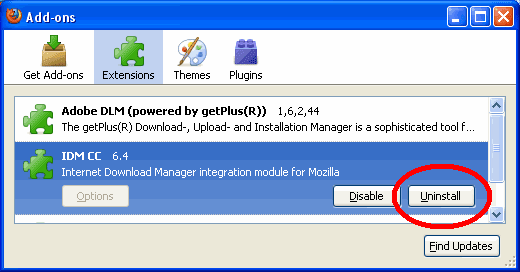 3.a. If "Uninstall" button is available (like on the picture above), press this button and confirm deinstallation. Then close and restart Firefox browser. On next start, Firefox will find and install the latest version of IDM CC extension automatically using system registry. Thats all.
3.b. If "Uninstall" button is not unavailable and if you are using the latest version of IDM and the integration does not work, its possible that you use an old version of IDM extension. In this case open this web-page in FireFox browser that you need IDM to be integrated to, then press this button:
Q. Firefox said it had disabled the IDM extension because it wasnt compatible. How do I resolve the problem?
Q. I cannot integrate IDM into FireFox 23, FireFox 22, FireFox 21, FireFox 20, FireFox 19, FireFox 18, FireFox 17, FireFox 16, FireFox 15, FireFox 14, FireFox 13, FireFox 12, FireFox 11, FireFox 10, FireFox 9, FireFox 8, FireFox 7, FireFox 6, FireFox 5, FireFox 4, FireFox 3). What should I do?
1. Please make sure that you have installed the latest version of IDM by using Help->Quick Update menu item. Please use "Help->Quick Update" IDM main menu item to get the latest version of IDM.
2. Dont forget to turn on the corresponding checkbox for browsers that you use in IDM Options -> General tab.
3. Its possible that you need to update IDM extension for Firefox. Pick "Tools->Add-ons" menu item in Firefox
Add-ons dialog should open. Click on "Extensions" tab and find IDM CC (Internet Download Manager integration module for Mozilla):
3.b. If "Uninstall" button is not unavailable and if you are using the latest version of IDM and the integration does not work, its possible that you use an old version of IDM extension. In this case open this web-page in FireFox browser that you need IDM to be integrated to, then press this button:
Click Here to Download
Go to link Download

Friday, January 20, 2017
Download IDM CC 7 3 70 for Firefox 29 beta IDM working for firefox
Download IDM CC 7 3 70 for Firefox 29 beta IDM working for firefox

Q. Firefox said it had disabled the IDM extension because it wasnt compatible. How do I resolve the problem?
Q. I cannot integrate IDM into Firefox 29 beta,FireFox28,FireFox 27, FireFox 26 (FireFox 25, FireFox 24, FireFox 23, FireFox 22, FireFox 21, FireFox 20, FireFox 19, FireFox 18, FireFox 17, FireFox 16, FireFox 15, FireFox 14, FireFox 13, FireFox 12, FireFox 11, FireFox 10, FireFox 9, FireFox 8, FireFox 7, FireFox 6, FireFox 5, FireFox 4, FireFox 3). What should I do?
1. Please make sure that you have installed the latest version of IDM by using Help->Quick Update menu item. Please use "Help->Quick Update" IDM main menu item to get the latest version of IDM.
2. Dont forget to turn on the corresponding checkbox for browsers that you use in IDM Options -> General tab.
3. Its possible that you need to update IDM extension for Firefox. Pick "Tools->Add-ons" menu item in Firefox
Add-ons dialog should open. Click on "Extensions" tab and find IDM CC (Internet Download Manager integration module for Mozilla):
3.b. If "Uninstall" button is not unavailable and if you are using the latest version of IDM and the integration does not work, its possible that you use an old version of IDM extension. In this case open this web-page in FireFox browser that you need IDM to be integrated to, then press this button:
Click Here to Download
Go to link Download
Friday, January 13, 2017
Download IDM CC 7 3 80 for Firefox 31 beta 2 IDM working for firefox 31 beta 2 latest
Download IDM CC 7 3 80 for Firefox 31 beta 2 IDM working for firefox 31 beta 2 latest
Q. Ive just updated Firefox to its newest version and IDM integration into Firefox stopped working. IDM does not take over downloads from Firefox anymore. What can I do to fix it?
Q. Firefox said it had disabled the IDM extension because it wasnt compatible. How do I resolve the problem?
Q. I cannot integrate IDM into Firefox 31 beta 2,Firefox 30,firefox 29,FireFox28,FireFox 27, FireFox 26 (FireFox 25, FireFox 24, FireFox 23, FireFox 22, FireFox 21, FireFox 20, FireFox 19, FireFox 18, FireFox 17, FireFox 16, FireFox 15, FireFox 14, FireFox 13, FireFox 12, FireFox 11, FireFox 10, FireFox 9, FireFox 8, FireFox 7, FireFox 6, FireFox 5, FireFox 4, FireFox 3). What should I do?
1. Please make sure that you have installed the latest version of IDM by using Help->Quick Update menu item. Please use "Help->Quick Update" IDM main menu item to get the latest version of IDM.
2. Dont forget to turn on the corresponding checkbox for browsers that you use in IDM Options -> General tab.
3. Its possible that you need to update IDM extension for Firefox. Pick "Tools->Add-ons" menu item in Firefox
Add-ons dialog should open. Click on "Extensions" tab and find IDM CC (Internet Download Manager integration module for Mozilla):
3.a. If "Uninstall" button is available (like on the picture above), press this button and confirm deinstallation. Then close and restart Firefox browser. On next start, Firefox will find and install the latest version of IDM CC extension automatically using system registry. Thats all.
3.b. If "Uninstall" button is not unavailable and if you are using the latest version of IDM and the integration does not work, its possible that you use an old version of IDM extension. In this case open this web-page in FireFox browser that you need IDM to be integrated to, then press this button:
Q. Firefox said it had disabled the IDM extension because it wasnt compatible. How do I resolve the problem?
Q. I cannot integrate IDM into Firefox 31 beta 2,Firefox 30,firefox 29,FireFox28,FireFox 27, FireFox 26 (FireFox 25, FireFox 24, FireFox 23, FireFox 22, FireFox 21, FireFox 20, FireFox 19, FireFox 18, FireFox 17, FireFox 16, FireFox 15, FireFox 14, FireFox 13, FireFox 12, FireFox 11, FireFox 10, FireFox 9, FireFox 8, FireFox 7, FireFox 6, FireFox 5, FireFox 4, FireFox 3). What should I do?
1. Please make sure that you have installed the latest version of IDM by using Help->Quick Update menu item. Please use "Help->Quick Update" IDM main menu item to get the latest version of IDM.
2. Dont forget to turn on the corresponding checkbox for browsers that you use in IDM Options -> General tab.
3. Its possible that you need to update IDM extension for Firefox. Pick "Tools->Add-ons" menu item in Firefox
Add-ons dialog should open. Click on "Extensions" tab and find IDM CC (Internet Download Manager integration module for Mozilla):
3.b. If "Uninstall" button is not unavailable and if you are using the latest version of IDM and the integration does not work, its possible that you use an old version of IDM extension. In this case open this web-page in FireFox browser that you need IDM to be integrated to, then press this button:
Click Here to Download( Direct Installation)
Go to link Download
Wednesday, January 11, 2017
Download Adobe Flash Professional CC v13 1 1 x64 Direct Link with Crack Full Version
Download Adobe Flash Professional CC v13 1 1 x64 Direct Link with Crack Full Version
![Download Adobe Flash Professional CC v13.1.1 x64 [Direct Link with Crack Full Version]](https://blogger.googleusercontent.com/img/b/R29vZ2xl/AVvXsEiDQUinjcIUcISeyozG00YOsyFRb6S-4LTh_mva0T5tODUdaJdTtHOGzAhLzyDu8hG1C21D-Ud404F3NfYmrBGfjctkimOkfPNwi0HHwVDdJDW8ow29tDki2IsH_2GEO2z2gFKG8fE3RWFw/s1600/adobe-flash-professional-cc.jpg "Download Adobe Flash Professional CC v13.1.1 x64 [Direct Link with Crack Full Version]") |
| Adobe Flash Professional CC v13.1.1 x64 |
Brand: Adobe
File size: 970 MB
Published: 09:23 - 92/10/30
Source: PC Download
Rating:

Download Instruction:
1st- Click Download Button Bellow.
2nd- wait 5 Second then Click Skip Ad

Password : www.p30download.com
Download:
 Download - Part I Download - Part II
Download Crack:
 Download crack
 Go to link Download
Download Full Photoshop CS6 CC 15 0 Crack Version Single Link Free
Download Full Photoshop CS6 CC 15 0 Crack Version Single Link Free
Go to link Download
Saturday, January 7, 2017
Download Adobe Muse CC v6 0 Build 751 Portable Adobe Muse Full Version Direct Link
Download Adobe Muse CC v6 0 Build 751 Portable Adobe Muse Full Version Direct Link
![Download Adobe Muse CC v6.0 Build 751 - Portable Adobe Muse [Full Version Direct Link]](https://blogger.googleusercontent.com/img/b/R29vZ2xl/AVvXsEg-fyMbXOWeO6ERA1J1_VDss3ZufvBNYZNG9ppgg4Khck16RMoi2MZM-sP-HO37fcCL7HsAEZglENxypT0yUb4K4mPem9-SRlBuBaAUCl0GZPc6BxrxjWSvdahMwgOOaCJRFCkuleQlcOxY/s1600/Adobe-Muse-CC_6.0_www.YasDL_.com_.jpg "Download Adobe Muse CC v6.0 Build 751 - Portable Adobe Muse [Full Version Direct Link]") |
| Adobe Muse CC v6.0 Build 751 - Portable Adobe Muse [Full Version Direct Link] |
Download Adobe Muse CC
Web Design and Development
Adobe Muse CC v6.0 Build 751 Professional website design makes use of code according to the features of the software is considered by many users. Adobe Muse enables graphic designers to make their content on the web page to get familiar with the features.
Adobe Muse CC font software supports hundreds of popular and useful Web pages that Web users are familiar with interactive features and links to other web pages to users is the perfect tools are. Using this software, you can design HTML pages to the latest web standards without coding and publishing. To download the latest software version Adobe Muse CC jasmine download from site to go to read more.
Key features Software Adobe Muse CC:
- Have hundreds of fonts popular web applications
- Add interactivity and links to web pages
- The option of hosting and web hosting
- Ability to Edit in Browser
- Using the latest web standards
- Intuitive site planning for desktop and mobile
- Tools and Test Site Preview
Adobe Muse was developed as a easy-to-use and powerful piece of software that can be used to create websites.
You can design and publish original HTML pages to the latest web standards without writing code. Adobe Muse enables designers to get their content on the web using familiar features.
System Requirements:
2.33GHz Intel ® Pentium ® 4, AMD Athlon ® 64 2800 +, or faster processor
Microsoft ® Windows ® XP Home, Professional, or Tablet PC Edition with Service Pack 3; Windows Server ® 2003 or 2008; Windows Vista ® Home Premium, Business, Ultimate, or Enterprise (including 64-bit editions) with Service Pack 2; Windows 7 or Windows 8
1GB of RAM
Adobe AIR 3.3
2.33GHz Intel ® Pentium ® 4, AMD Athlon ® 64 2800 +, or faster processor
Microsoft ® Windows ® XP Home, Professional, or Tablet PC Edition with Service Pack 3; Windows Server ® 2003 or 2008; Windows Vista ® Home Premium, Business, Ultimate, or Enterprise (including 64-bit editions) with Service Pack 2; Windows 7 or Windows 8
1GB of RAM
Adobe AIR 3.3
Description Install the software Adobe Muse CC:
- To run Setup Adobe Air 3.3 application software must be installed on your system is higher.
- After Khazj file uncompress and install the software from automatically launching after installation to prevent.
- Place the crack files in the folder, copy and replace software installation.
- Enjoy your software.
Brand: Adobe File Size: 36.6 MB
Source: PC Download
Rating:

Download Instruction:
1st- Click Download Button Bellow.
2nd- wait 5 Second then Click Skip Ad
Password : www.p30download.com
Download:
Download Setup
Download Crack (Alone)
If You Like This Please Leave a Comment Or Share this Post
1st- Click Download Button Bellow.
2nd- wait 5 Second then Click Skip Ad
Password : www.p30download.com
Download:
Download Setup
Download Crack (Alone)
If You Like This Please Leave a Comment Or Share this Post

Go to link Download
Friday, January 6, 2017
Download IDM CC 7 3 78 for Firefox 30 IDM working for firefox
Download IDM CC 7 3 78 for Firefox 30 IDM working for firefox
Q. Ive just updated Firefox to its newest version and IDM integration into Firefox stopped working. IDM does not take over downloads from Firefox anymore. What can I do to fix it?
Q. Firefox said it had disabled the IDM extension because it wasnt compatible. How do I resolve the problem?
Q. I cannot integrate IDM into FireFox28,FireFox 27, FireFox 26 (FireFox 25, FireFox 24, FireFox 23, FireFox 22, FireFox 21, FireFox 20, FireFox 19, FireFox 18, FireFox 17, FireFox 16, FireFox 15, FireFox 14, FireFox 13, FireFox 12, FireFox 11, FireFox 10, FireFox 9, FireFox 8, FireFox 7, FireFox 6, FireFox 5, FireFox 4, FireFox 3). What should I do?
1. Please make sure that you have installed the latest version of IDM by using Help->Quick Update menu item. Please use "Help->Quick Update" IDM main menu item to get the latest version of IDM.
2. Dont forget to turn on the corresponding checkbox for browsers that you use in IDM Options -> General tab.
3. Its possible that you need to update IDM extension for Firefox. Pick "Tools->Add-ons" menu item in Firefox
Add-ons dialog should open. Click on "Extensions" tab and find IDM CC (Internet Download Manager integration module for Mozilla):
3.a. If "Uninstall" button is available (like on the picture above), press this button and confirm deinstallation. Then close and restart Firefox browser. On next start, Firefox will find and install the latest version of IDM CC extension automatically using system registry. Thats all.
3.b. If "Uninstall" button is not unavailable and if you are using the latest version of IDM and the integration does not work, its possible that you use an old version of IDM extension. In this case open this web-page in FireFox browser that you need IDM to be integrated to, then press this button:
Q. Firefox said it had disabled the IDM extension because it wasnt compatible. How do I resolve the problem?
Q. I cannot integrate IDM into FireFox28,FireFox 27, FireFox 26 (FireFox 25, FireFox 24, FireFox 23, FireFox 22, FireFox 21, FireFox 20, FireFox 19, FireFox 18, FireFox 17, FireFox 16, FireFox 15, FireFox 14, FireFox 13, FireFox 12, FireFox 11, FireFox 10, FireFox 9, FireFox 8, FireFox 7, FireFox 6, FireFox 5, FireFox 4, FireFox 3). What should I do?
1. Please make sure that you have installed the latest version of IDM by using Help->Quick Update menu item. Please use "Help->Quick Update" IDM main menu item to get the latest version of IDM.
2. Dont forget to turn on the corresponding checkbox for browsers that you use in IDM Options -> General tab.
3. Its possible that you need to update IDM extension for Firefox. Pick "Tools->Add-ons" menu item in Firefox
Add-ons dialog should open. Click on "Extensions" tab and find IDM CC (Internet Download Manager integration module for Mozilla):
3.b. If "Uninstall" button is not unavailable and if you are using the latest version of IDM and the integration does not work, its possible that you use an old version of IDM extension. In this case open this web-page in FireFox browser that you need IDM to be integrated to, then press this button:
Click Here to Download
Go to link Download
Monday, December 19, 2016
Download IDM CC 7 3 69 for Firefox 28 IDM working for firefox
Download IDM CC 7 3 69 for Firefox 28 IDM working for firefox
Q. Ive just updated Firefox to its newest version and IDM integration into Firefox stopped working. IDM does not take over downloads from Firefox anymore. What can I do to fix it?
Q. Firefox said it had disabled the IDM extension because it wasnt compatible. How do I resolve the problem?
Q. I cannot integrate IDM into FireFox28,FireFox 27, FireFox 26 (FireFox 25, FireFox 24, FireFox 23, FireFox 22, FireFox 21, FireFox 20, FireFox 19, FireFox 18, FireFox 17, FireFox 16, FireFox 15, FireFox 14, FireFox 13, FireFox 12, FireFox 11, FireFox 10, FireFox 9, FireFox 8, FireFox 7, FireFox 6, FireFox 5, FireFox 4, FireFox 3). What should I do?
1. Please make sure that you have installed the latest version of IDM by using Help->Quick Update menu item. Please use "Help->Quick Update" IDM main menu item to get the latest version of IDM.
2. Dont forget to turn on the corresponding checkbox for browsers that you use in IDM Options -> General tab.
3. Its possible that you need to update IDM extension for Firefox. Pick "Tools->Add-ons" menu item in Firefox
Add-ons dialog should open. Click on "Extensions" tab and find IDM CC (Internet Download Manager integration module for Mozilla):
3.a. If "Uninstall" button is available (like on the picture above), press this button and confirm deinstallation. Then close and restart Firefox browser. On next start, Firefox will find and install the latest version of IDM CC extension automatically using system registry. Thats all.
3.b. If "Uninstall" button is not unavailable and if you are using the latest version of IDM and the integration does not work, its possible that you use an old version of IDM extension. In this case open this web-page in FireFox browser that you need IDM to be integrated to, then press this button:
Q. Firefox said it had disabled the IDM extension because it wasnt compatible. How do I resolve the problem?
Q. I cannot integrate IDM into FireFox28,FireFox 27, FireFox 26 (FireFox 25, FireFox 24, FireFox 23, FireFox 22, FireFox 21, FireFox 20, FireFox 19, FireFox 18, FireFox 17, FireFox 16, FireFox 15, FireFox 14, FireFox 13, FireFox 12, FireFox 11, FireFox 10, FireFox 9, FireFox 8, FireFox 7, FireFox 6, FireFox 5, FireFox 4, FireFox 3). What should I do?
1. Please make sure that you have installed the latest version of IDM by using Help->Quick Update menu item. Please use "Help->Quick Update" IDM main menu item to get the latest version of IDM.
2. Dont forget to turn on the corresponding checkbox for browsers that you use in IDM Options -> General tab.
3. Its possible that you need to update IDM extension for Firefox. Pick "Tools->Add-ons" menu item in Firefox
Add-ons dialog should open. Click on "Extensions" tab and find IDM CC (Internet Download Manager integration module for Mozilla):
3.b. If "Uninstall" button is not unavailable and if you are using the latest version of IDM and the integration does not work, its possible that you use an old version of IDM extension. In this case open this web-page in FireFox browser that you need IDM to be integrated to, then press this button:
Click Here to Download
Go to link Download
Wednesday, November 23, 2016
Download IDM CC 7 3 85 for Firefox 32 IDM working for firefox
Download IDM CC 7 3 85 for Firefox 32 IDM working for firefox
Q. Ive just updated Firefox to its newest version and IDM integration into Firefox stopped working. IDM does not take over downloads from Firefox anymore. What can I do to fix it?
Q. Firefox said it had disabled the IDM extension because it wasnt compatible. How do I resolve the problem?
Q. I cannot integrate IDM into Firefox 32, Firefox 31, Firefox 30,Firefox 29, FireFox28, FireFox 27, FireFox 26 (FireFox 25, FireFox 24, FireFox 23, FireFox 22, FireFox 21, FireFox 20, FireFox 19, FireFox 18, FireFox 17, FireFox 16, FireFox 15, FireFox 14, FireFox 13, FireFox 12, FireFox 11, FireFox 10, FireFox 9, FireFox 8, FireFox 7, FireFox 6, FireFox 5, FireFox 4, FireFox 3). What should I do?
1. Please make sure that you have installed the latest version of IDM by using Help->Quick Update menu item. Please use "Help->Quick Update" IDM main menu item to get the latest version of IDM.
2. Dont forget to turn on the corresponding checkbox for browsers that you use in IDM Options -> General tab.
3. Its possible that you need to update IDM extension for Firefox. Pick "Tools->Add-ons" menu item in Firefox
Add-ons dialog should open. Click on "Extensions" tab and find IDM CC (Internet Download Manager integration module for Mozilla):
3.a. If "Uninstall" button is available (like on the picture above), press this button and confirm deinstallation. Then close and restart Firefox browser. On next start, Firefox will find and install the latest version of IDM CC extension automatically using system registry. Thats all.
3.b. If "Uninstall" button is not unavailable and if you are using the latest version of IDM and the integration does not work, its possible that you use an old version of IDM extension. In this case open this web-page in FireFox browser that you need IDM to be integrated to, then press this button:
Q. Firefox said it had disabled the IDM extension because it wasnt compatible. How do I resolve the problem?
Q. I cannot integrate IDM into Firefox 32, Firefox 31, Firefox 30,Firefox 29, FireFox28, FireFox 27, FireFox 26 (FireFox 25, FireFox 24, FireFox 23, FireFox 22, FireFox 21, FireFox 20, FireFox 19, FireFox 18, FireFox 17, FireFox 16, FireFox 15, FireFox 14, FireFox 13, FireFox 12, FireFox 11, FireFox 10, FireFox 9, FireFox 8, FireFox 7, FireFox 6, FireFox 5, FireFox 4, FireFox 3). What should I do?
1. Please make sure that you have installed the latest version of IDM by using Help->Quick Update menu item. Please use "Help->Quick Update" IDM main menu item to get the latest version of IDM.
2. Dont forget to turn on the corresponding checkbox for browsers that you use in IDM Options -> General tab.
3. Its possible that you need to update IDM extension for Firefox. Pick "Tools->Add-ons" menu item in Firefox
Add-ons dialog should open. Click on "Extensions" tab and find IDM CC (Internet Download Manager integration module for Mozilla):
3.b. If "Uninstall" button is not unavailable and if you are using the latest version of IDM and the integration does not work, its possible that you use an old version of IDM extension. In this case open this web-page in FireFox browser that you need IDM to be integrated to, then press this button:
Click Here to Download
Go to link Download
Tuesday, November 15, 2016
Download latest IDM CC 7 3 67 for Firefox 22 IDM working for firefox 22
Download latest IDM CC 7 3 67 for Firefox 22 IDM working for firefox 22

Q. Firefox said it had disabled the IDM extension because it wasnt compatible. How do I resolve the problem?
Q. I cannot integrate IDM into FireFox 27, FireFox 26 (FireFox 25, FireFox 24, FireFox 23, FireFox 22, FireFox 21, FireFox 20, FireFox 19, FireFox 18, FireFox 17, FireFox 16, FireFox 15, FireFox 14, FireFox 13, FireFox 12, FireFox 11, FireFox 10, FireFox 9, FireFox 8, FireFox 7, FireFox 6, FireFox 5, FireFox 4, FireFox 3). What should I do?
1. Please make sure that you have installed the latest version of IDM by using Help->Quick Update menu item. Please use "Help->Quick Update" IDM main menu item to get the latest version of IDM.
2. Dont forget to turn on the corresponding checkbox for browsers that you use in IDM Options -> General tab.
3. Its possible that you need to update IDM extension for Firefox. Pick "Tools->Add-ons" menu item in Firefox
Add-ons dialog should open. Click on "Extensions" tab and find IDM CC (Internet Download Manager integration module for Mozilla):
3.b. If "Uninstall" button is not unavailable and if you are using the latest version of IDM and the integration does not work, its possible that you use an old version of IDM extension. In this case open this web-page in FireFox browser that you need IDM to be integrated to, then press this button:
Click Here to Download
Go to link Download
Tuesday, November 8, 2016
Download IDM CC 7 3 67 for Firefox 24 IDM working for firefox
Download IDM CC 7 3 67 for Firefox 24 IDM working for firefox
Q. Firefox said it had disabled the IDM extension because it wasnt compatible. How do I resolve the problem?
Q. I cannot integrate IDM into FireFox 25, FireFox 24, FireFox 23, FireFox 22, FireFox 21, FireFox 20, FireFox 19, FireFox 18, FireFox 17, FireFox 16, FireFox 15, FireFox 14, FireFox 13, FireFox 12, FireFox 11, FireFox 10, FireFox 9, FireFox 8, FireFox 7, FireFox 6, FireFox 5, FireFox 4, FireFox 3). What should I do?
1. Please make sure that you have installed the latest version of IDM by using Help->Quick Update menu item. Please use "Help->Quick Update" IDM main menu item to get the latest version of IDM.
2. Dont forget to turn on the corresponding checkbox for browsers that you use in IDM Options -> General tab.
3. Its possible that you need to update IDM extension for Firefox. Pick "Tools->Add-ons" menu item in Firefox
Add-ons dialog should open. Click on "Extensions" tab and find IDM CC (Internet Download Manager integration module for Mozilla):
3.b. If "Uninstall" button is not unavailable and if you are using the latest version of IDM and the integration does not work, its possible that you use an old version of IDM extension. In this case open this web-page in FireFox browser that you need IDM to be integrated to, then press this button:
Donwload:
Click Here to Download
Go to link Download
Saturday, November 5, 2016
Download Dreamweaver CC PDF
Download Dreamweaver CC PDF

Creator: Go to Amazons Ben Negrino Webpage | Terminology: English language | ISBN:
No cost download Download Dreamweaver CC: Aesthetic QuickStart Guideline Publication – September 31, 2013 PDF from with Mediafire Website link Download Website link With the discharge of Adobe Imaginative Suite CC, Dreamweaver once more solidifies its function as the de facto application of selection for anyone creating for the Net. Adobe Dreamweaver CC: Aesthetic QuickStart Guideline makes use of a blend of task-based coaching and sturdy visuals to educate start and more advanced consumers how to create, style, and publish strong, innovative Net internet sites with Dreamweaver. Major technology creators Ben Negrino and Dori Cruz consider you step-by-step through the brand-new characteristics in Adobe Dreamweaver CC, wiwith modified parts on essential resources like hair styling web pages with CSS entirely,anaging models, and putting dining tables. Youll likewise find out to consider edge of Dreamweavers capacity to at the same time design internet sites for a selection of display screen sizes, which include desktops, capsules, and cellular mobile phones. If youre brand-new to Dreamweaver and net design and style, youll find out to generate your very first Web internet site, add text message, type and place out webpage articles, manage models, job with back links, incorporate photos, media, dining tables, forms, design and style site course-plotting, and thus much considerably more. If youre an seasoned customer, youll locate this a easy guide to the brand-new characteristics of Dreamweaver CC. Includes eBook In add-on to concise, step-by-step answers of key resources and duties, with lots of beneficial screen pictures to retain you on trail as you job, Dreamweaver CC: Aesthetic QuickStart Guideline contains the eBook. You can download electronic digital types of this publication to fill on the cellular system of your selection thus that you can continue understanding whenever and wherever you will be. We supply you with EPUB, PDF, and MOBI eBook formats to guarantee that the knowledge is got by you that best matches your seeing needs.
Done.
Direct download back links accessible for Download Dreamweaver CC: Visual QuickStart Guideline Publication – September 31, 2013 PDFPdf Dreamweaver CC Aesthetic QuickStart Guideline Aesthetic Dreamweaver CC Aesthetic QuickStart Guideline September 31 2013 Writer Peachpit Click Pdf Dreamweaver CC Aesthetic QuickStart Guideline Aesthetic Quickstart Instructions publication Dreamweaver CC Aesthetic QuickStart Guideline Publication time September 2013 31 99 Our value 28 99 You save 3 00 Dreamweaver CC Aesthetic QuickStart Guideline contains the eBook Dreamweaver CC Aesthetic QuickStart Guideline Staples Go shopping Staples for Dreamweaver CC Aesthetic QuickStart Guideline Enjoy each day low rates and acquire everything you want for a residence business office or enterprise Dreamweaver CC Aesthetic QuickStart Guideline Dreamweaver CC Aesthetic QuickStart Guideline Copyright laws 2014 Posted Date August 31 2013 Firefox Publication 19 99
Sequence: Aesthetic QuickStart GuidelinePublication: 528 web pagesWriter: Peachpit Click; 1 release (September 31, 2013)Terminology: English languageISBN-10: 0321929519ISBN-13: 978-0321929518Merchandise Measurements: 7 back button 0.9 x 9 inches- Delivery Pounds: 2.2 weight (Look at shipping costs and plans)
- Amazon online Best Vendors Get ranking: #300,579 in Textbooks (Notice Leading 100 in Textbooks)
- #25 in Textbooks > Personal computers & Technological innovation > Digital Music, Video clip & Pictures > Adobe >
Adobe Dreamweaver
- #25 in Textbooks > Personal computers & Technological innovation > Digital Music, Video clip & Pictures > Adobe >
This will be a expected publication for a school I was using on the CS6 variation. There will be many display screen pictures and this allows concrete floor the principles. It looks to deal with some enhanced matters as properly and will be considerably more than a speedy overview.
Went into details extremely helpful very clear and complete explanationsOrganization will be super simply because will be visuals happy I bought this reference Barbara Reiner
Download Dreamweaver CC: Aesthetic QuickStart Guideline – September 31, 2013 Download

Go to link Download
Wednesday, November 2, 2016
Download IDM CC 7 3 85 for Firefox 31 IDM working for firefox
Download IDM CC 7 3 85 for Firefox 31 IDM working for firefox
Q. Ive just updated Firefox to its newest version and IDM integration into Firefox stopped working. IDM does not take over downloads from Firefox anymore. What can I do to fix it?
Q. Firefox said it had disabled the IDM extension because it wasnt compatible. How do I resolve the problem?
Q. I cannot integrate IDM into Firefox 32, Firefox 31, Firefox 30,Firefox 29, FireFox28, FireFox 27, FireFox 26 (FireFox 25, FireFox 24, FireFox 23, FireFox 22, FireFox 21, FireFox 20, FireFox 19, FireFox 18, FireFox 17, FireFox 16, FireFox 15, FireFox 14, FireFox 13, FireFox 12, FireFox 11, FireFox 10, FireFox 9, FireFox 8, FireFox 7, FireFox 6, FireFox 5, FireFox 4, FireFox 3). What should I do?
1. Please make sure that you have installed the latest version of IDM by using Help->Quick Update menu item. Please use "Help->Quick Update" IDM main menu item to get the latest version of IDM.
2. Dont forget to turn on the corresponding checkbox for browsers that you use in IDM Options -> General tab.
3. Its possible that you need to update IDM extension for Firefox. Pick "Tools->Add-ons" menu item in Firefox
Add-ons dialog should open. Click on "Extensions" tab and find IDM CC (Internet Download Manager integration module for Mozilla):
3.a. If "Uninstall" button is available (like on the picture above), press this button and confirm deinstallation. Then close and restart Firefox browser. On next start, Firefox will find and install the latest version of IDM CC extension automatically using system registry. Thats all.
3.b. If "Uninstall" button is not unavailable and if you are using the latest version of IDM and the integration does not work, its possible that you use an old version of IDM extension. In this case open this web-page in FireFox browser that you need IDM to be integrated to, then press this button:
Q. Firefox said it had disabled the IDM extension because it wasnt compatible. How do I resolve the problem?
Q. I cannot integrate IDM into Firefox 32, Firefox 31, Firefox 30,Firefox 29, FireFox28, FireFox 27, FireFox 26 (FireFox 25, FireFox 24, FireFox 23, FireFox 22, FireFox 21, FireFox 20, FireFox 19, FireFox 18, FireFox 17, FireFox 16, FireFox 15, FireFox 14, FireFox 13, FireFox 12, FireFox 11, FireFox 10, FireFox 9, FireFox 8, FireFox 7, FireFox 6, FireFox 5, FireFox 4, FireFox 3). What should I do?
1. Please make sure that you have installed the latest version of IDM by using Help->Quick Update menu item. Please use "Help->Quick Update" IDM main menu item to get the latest version of IDM.
2. Dont forget to turn on the corresponding checkbox for browsers that you use in IDM Options -> General tab.
3. Its possible that you need to update IDM extension for Firefox. Pick "Tools->Add-ons" menu item in Firefox
Add-ons dialog should open. Click on "Extensions" tab and find IDM CC (Internet Download Manager integration module for Mozilla):
3.b. If "Uninstall" button is not unavailable and if you are using the latest version of IDM and the integration does not work, its possible that you use an old version of IDM extension. In this case open this web-page in FireFox browser that you need IDM to be integrated to, then press this button:
Click Here to Download
Go to link Download
Tuesday, November 1, 2016
Download IDM CC 7 3 67 for Firefox 26 IDM working for firefox
Download IDM CC 7 3 67 for Firefox 26 IDM working for firefox
Q. Ive just updated Firefox to its newest version and IDM integration into Firefox stopped working. IDM does not take over downloads from Firefox anymore. What can I do to fix it?
Q. Firefox said it had disabled the IDM extension because it wasnt compatible. How do I resolve the problem?
Q. I cannot integrate IDM into FireFox 27, FireFox 26 (FireFox 25, FireFox 24, FireFox 23, FireFox 22, FireFox 21, FireFox 20, FireFox 19, FireFox 18, FireFox 17, FireFox 16, FireFox 15, FireFox 14, FireFox 13, FireFox 12, FireFox 11, FireFox 10, FireFox 9, FireFox 8, FireFox 7, FireFox 6, FireFox 5, FireFox 4, FireFox 3). What should I do?
1. Please make sure that you have installed the latest version of IDM by using Help->Quick Update menu item. Please use "Help->Quick Update" IDM main menu item to get the latest version of IDM.
2. Dont forget to turn on the corresponding checkbox for browsers that you use in IDM Options -> General tab.
3. Its possible that you need to update IDM extension for Firefox. Pick "Tools->Add-ons" menu item in Firefox
Add-ons dialog should open. Click on "Extensions" tab and find IDM CC (Internet Download Manager integration module for Mozilla):
3.a. If "Uninstall" button is available (like on the picture above), press this button and confirm deinstallation. Then close and restart Firefox browser. On next start, Firefox will find and install the latest version of IDM CC extension automatically using system registry. Thats all.
3.b. If "Uninstall" button is not unavailable and if you are using the latest version of IDM and the integration does not work, its possible that you use an old version of IDM extension. In this case open this web-page in FireFox browser that you need IDM to be integrated to, then press this button:
Q. Firefox said it had disabled the IDM extension because it wasnt compatible. How do I resolve the problem?
Q. I cannot integrate IDM into FireFox 27, FireFox 26 (FireFox 25, FireFox 24, FireFox 23, FireFox 22, FireFox 21, FireFox 20, FireFox 19, FireFox 18, FireFox 17, FireFox 16, FireFox 15, FireFox 14, FireFox 13, FireFox 12, FireFox 11, FireFox 10, FireFox 9, FireFox 8, FireFox 7, FireFox 6, FireFox 5, FireFox 4, FireFox 3). What should I do?
1. Please make sure that you have installed the latest version of IDM by using Help->Quick Update menu item. Please use "Help->Quick Update" IDM main menu item to get the latest version of IDM.
2. Dont forget to turn on the corresponding checkbox for browsers that you use in IDM Options -> General tab.
3. Its possible that you need to update IDM extension for Firefox. Pick "Tools->Add-ons" menu item in Firefox
Add-ons dialog should open. Click on "Extensions" tab and find IDM CC (Internet Download Manager integration module for Mozilla):
3.b. If "Uninstall" button is not unavailable and if you are using the latest version of IDM and the integration does not work, its possible that you use an old version of IDM extension. In this case open this web-page in FireFox browser that you need IDM to be integrated to, then press this button:
Click Here to Download
Go to link Download
Sunday, October 30, 2016
Download idm cc for google chrome version 33 0 1750 How to configure IDM extension for Chrome
Download idm cc for google chrome version 33 0 1750 How to configure IDM extension for Chrome

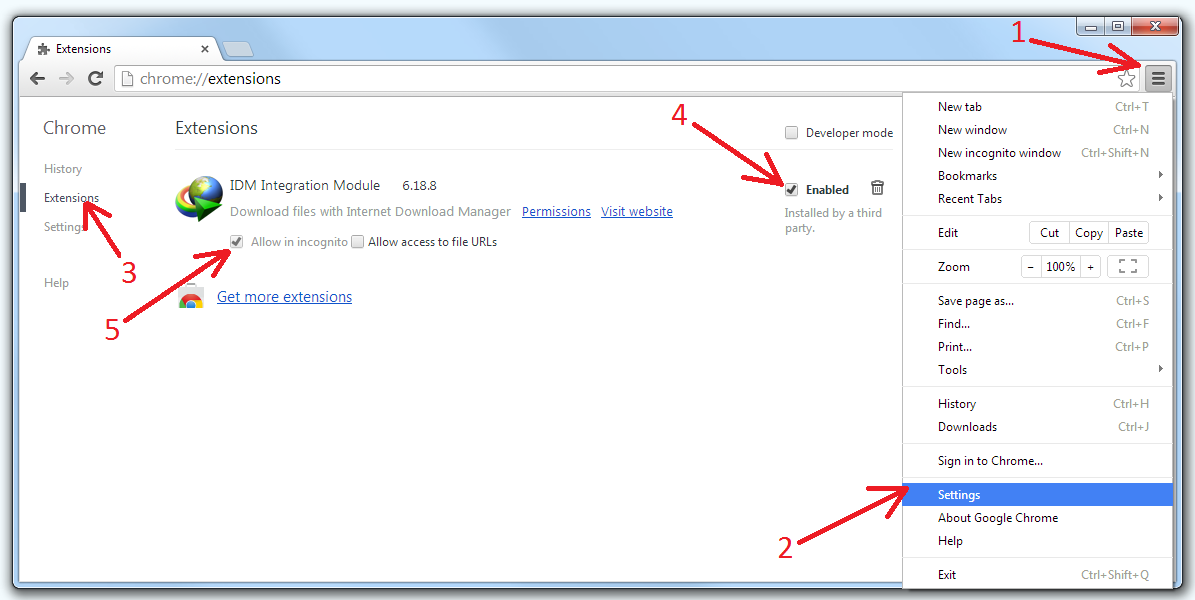
Step 1 : You need to press on Chrome menu (arrow 1 on the image)
Step 2 : Select "Settings" menu item (arrow 2 on the image).
Step 3 : Then select "Extensions" tab (arrow 3 on the image).
Step 4 : Check that "IDM Integration Module" extension is enabled (arrow 4 on the image).
Step 5 : If you use incognito mode in Chrome, you need to enable "Allow in incognito" checkbox (arrow 5 on the image).
Step 1 : You need to open IDM installation folder ("C:Program FilesInternet Download Manager" by default, arrow 1 on the image)
Step 2 : Then drag and drop "IDMGCExt.crx" (arrow 2 on the image) file into "Extensions" page opened in your Chrome browser (arrow 3 on the image)
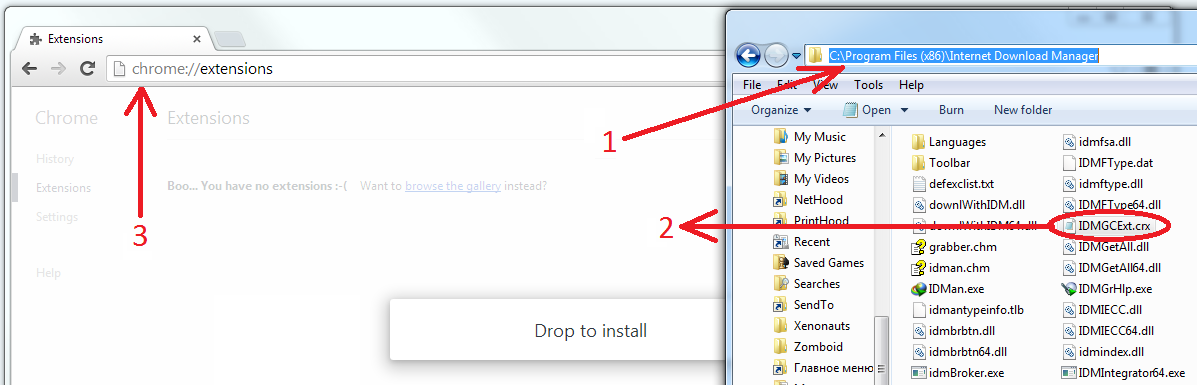
If you dont have that file then you can download it from here.
Note: It is for your Personal Use as Google Chrome remove the Extension as it Cause Instability. Its for your Educational Purpose.
Download mirrors:
- Click here to Download idmgcExt file
Go to link Download
Thursday, October 20, 2016
Download Adobe Illustrator CC v17 3 Full Version Direct Link with Crack
Download Adobe Illustrator CC v17 3 Full Version Direct Link with Crack
![Download Adobe Illustrator CC v17.3 - [Full Version Direct Link with Crack]](https://blogger.googleusercontent.com/img/b/R29vZ2xl/AVvXsEj650c7O0j-TNvD3Vn1jU8DZ07Zt7ZxWAotTDyfy1aoSi5ieb69PFLZh4woHrfAxE3UnvYmUZ7btwigzF8QVPFIs_YrhZx6_lq7JABrRL_nh3NAhajPKi5wu0HzcPs1hbX2ZQauIWifJvDc/s1600/1371710548_adobe-illustrator-cc.jpg "Download Adobe Illustrator CC v17.3 - [Full Version Direct Link with Crack]") |
| Adobe Illustrator CC v17.3 - [Full Version Direct Link with Crack] |
A key feature of the software Adobe Illustrator CC:
- Advanced vector drawing tools
- Tools for Touch Typing
- Find a font
- Faster performance
- Ability to create crisp designs for websites and mobile phones
- The coloring and the perspective projection
- Ability to import multiple files at the same time and with the new control scheme, you Aylastrytvr
- Ability to design very complex vector designs with advanced capabilities
- Extract CSS
- Ability to drag multiple projects related to a specific device to adjust the output size
- Pictures Unembedded
- Package File
- Support for Persian language
- Compatible with different versions of Windows
Brand: Adobe
File Size: 3420 MB
Published: 08:20 - 92/11/10
Source: PC Download
Rating:
- Advanced vector drawing tools
- Tools for Touch Typing
- Find a font
- Faster performance
- Ability to create crisp designs for websites and mobile phones
- The coloring and the perspective projection
- Ability to import multiple files at the same time and with the new control scheme, you Aylastrytvr
- Ability to design very complex vector designs with advanced capabilities
- Extract CSS
- Ability to drag multiple projects related to a specific device to adjust the output size
- Pictures Unembedded
- Package File
- Support for Persian language
- Compatible with different versions of Windows
Brand: Adobe
File Size: 3420 MB
Published: 08:20 - 92/11/10
Source: PC Download
Rating:
Download Instruction:
1st- Click Download Button Bellow.
2nd- wait 5 Second then Click Skip Ad
Password : www.p30download.com
Download:
1st- Click Download Button Bellow.
2nd- wait 5 Second then Click Skip Ad
Password : www.p30download.com
Download:
 Size: 3420 MB Download - Part One Download - Part II Download - Part III Download - Part IV Download - Part V Download - Part VI Download - Part VII Download crack (alone)
 Go to link Download
Subscribe to:
Posts (Atom)